Untitled Document
Browse
By Manufacturer:
Brother
Canon
HP
Okidata
Panasonic
Ricoh
Samsung
Sharp
Toshiba
Xerox
Browse By Category
Dual Line Fax Machines
Personal
Fax Machines
Multi
Function Fax Machines
Small
Business Fax Machines
High
Volume Fax Machines
Network-Ready
Fax Machines
Fax
Toner and Cartridge Supplies
Company
Information:
About
Us
Contact Us
FAQ/Privacy Policy
Visit Our Affiliates:
www.copierswarehouse.com
www.a1plasma.com
1, 2,
3, 4,
5, 6,
7,
8, 9,
10, 11,
12,
13, 14,
15, 16,
17,
18, 19,
20, 21,
22,
23, 24,
25, 26
|
|
|
|
| BROTHER
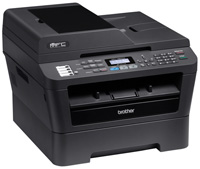
MFC-7860DW Laser All-in-One with Wireless Networking and Duplex Printing
Item #: BROMFC7860DW
Mfr Part #: MFC7860DW
Now
Only $264.49
Add
To Cart
View
Cart/Checkout
|
|
|
|
Recommended Accessories:
|
|
Brother
- DR420 Drum Unit (Yield: 12,000 pages) |
$64.99 |
|
Brother
- TN420 Standard Yield Toner (Yield: 1,200 pages) |
$27.99 |
|
Brother
- TN450 High Yield Toner (yield: 2,600 pages) |
$43.49 |
|
| Mack
- 3 Year Extended Warranty |
$59.99 |
|
|
Description:
Laser All-in-One for your Desktop or Small Office
The MFC-7860DW offers everything you need in a monochrome laser all-in-one for your small business or home office. It offers high-quality printing and also can be used to make a quick copy or send/receive faxes without using a computer. Scan multiple pages using the 35-page capacity auto document feeder or use the document glass for scanning a single document. Its advanced capabilities allow you to scan documents to a file, image, OCR, E-mail, FTP site or E-mail Server. Plus, its built-in wireless 802.11b/g and Ethernet network interfaces allow you to easily share the MFC-7860DW, and its duplex printing capability enables you to produce professional-looking two-sided output.
Features:
- Flexible connectivity. Built-in wireless 802.11b/g and Ethernet network interfaces for sharing with multiple users on your network or connect locally to a single computer via its USB interface.
- Fast printing and copying. Help improve your productivity with print and copy speeds of up to 27ppm and produce professional-looking output at up to 2400 x 600 dpi.
- Easily produce two-sided output. Print professional-looking two-sided documents and booklets using the automatic duplex printing feature. Also, create two-sided output from one-sided originals when copying and faxing. This feature helps to reduce paper use and saves money.
- Convenient paper handling. The MFC-7860DW can meet all of your printing needs via an adjustable, 250-sheet capacity paper tray that easily handles letter or legal size paper and a manual feed slot for printing envelopes and letterhead.
- Versatile, high-quality color scanning. Offers an up to 19200 x 19200 dpi (interpolated) resolution and a variety of "scan-to" features
- Brother iPrint&Scan. Free app download for wireless printing (JPEG images) from and scanning to your Android smartphone.
- Straight-through paper path. A manual feed slot and rear paper exit provide a straight-through paper path to ensure that all of your printed materials always look their best.
- Time-saving ID copy feature. Copy both sides of your identification card onto one page, keeping the original card size.
|
| |
|
|
|
| |
|
|
|
| |
|
|
|
| |
|
|
|
| |
|
|
|
| |
|
|
|
|